
The Schedule Reconciliation feature allows users to efficiently adjust discrepancies and reconcile offsetting entries. This feature can resolve the following use cases:
-
Balanced credit and debit entries on the same schedule
-
Balanced credit and debit entries on the same schedule with the same control
-
Entry(ies) that need to be removed from one schedule control and moved to another account
-
Correction
-
Write-off outstanding balance
-
Schedule Reconciliation
Navigate to: Accounting > General Ledger > Schedule Reconciliation.
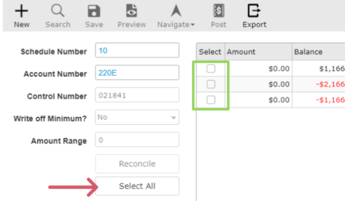
Begin by entering the Schedule Number and Account Number; the system then displays related entries in the grid on the right.
-
The Control Number is displayed when applicable, and optional filters such as Write-off Minimum and Amount Range can be used to narrow the results.
-
Each row in the grid shows the Amount and resulting Balance, making it easy to identify offsetting debit and credit entries (for example, balances that net to zero or near zero).
-
From the grid, the user can select individual entries (or use Select All) and click Reconcile to resolve them. If the write-off criteria are met, outstanding balances can be cleared at the defined minimum.
The Schedule Reconciliation Grid includes the following hyperlinked columns, making it easier to efficiently isolate, adjust, move, or write off entries.
-
Batch
- When the Batch # hyperlink is selected, a new tab opens in Journals with that batch number isolated
- All entries related to that Batch number are displayed.
- Reference
- When the Reference # hyperlink is selected, a new tab opens the record ex, if the reference is for a deal, open Deal in a new tab.
- Control
- When the Control # hyperlink is selected, it opens the control record in a new tab