
The Salesperson Count Report monitors all deals completed during a selected time period by each salesperson involved.
Frequency: Monthly/Weekly
What it's uses for: Review a count of sales per salesperson
Who uses it: Dealership Managers (GM, GSM, F&I)
Navigate to: Sales > Reports > Sales > Salesperson Count
Choose Parameters
This section clarifies the parameters outlined in this report. For additional details that apply to all reports, please refer to the Common Report Features article.
Customer Class – Select specifically to generate report information based on the type of customer – Retail, Commercial, Fleet, or Wholesale. All is the default. Multiples can be selected.
Salespeople - Select specific salespeople) which the report should track. All is the default. Multiple salespeople can be selected.
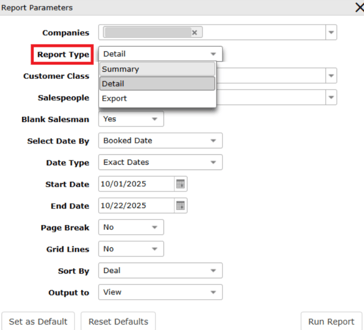
Blank Salesman - Select to filter for deals where no salesperson is listed. The default is Yes, which includes any deals for which no salesperson is credited. No would filter out any deals where no salesperson is listed.
Select Date By – Select to generate report data based on the status of the deal. Options are Booked Date, Date Sold, Closed Date, and Posted Date. Booked Date is the default.