
The Sales Summary Report analyzes sales data over specific time periods and provides various options for data grouping.
Frequency: Monthly
How it's used: To explore alternative methods for evaluating sales totals.
Who uses it: Dealership Managers (GM, GSM, F&I)
Choose Parameters
This section clarifies the parameters outlined in this report. For additional details that apply to all reports, please refer to the Common Report Features article.
Report Type – Detail and Summary will generate the report data in VUE. Export will generate an Excel spreadsheet. Detail will provide customer information in the report data. Summary will provide dealership totals only. Detail is the default.
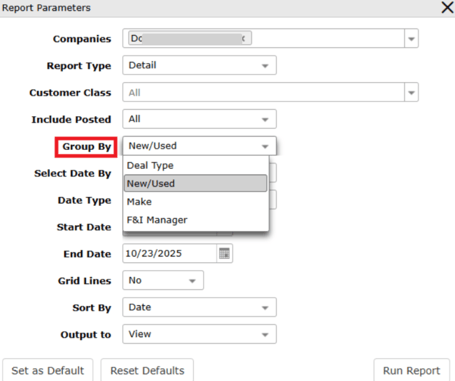
Customer Class – Select specifically to generate report information based on the type of customer – Retail, Commercial, Fleet, or Wholesale. All is the default. Multiples can be selected.
Include Posted – Select to generate report data on sold deals that are posted or not.
-
Yes generates data only on deals that are posted.
-
No generates data only on deals that are not posted. All generates data on both posted and unposted deals. All is the default.
Select Date By – Select to generate report data based on the the status of the deal. Options are Booked Date, Date Sold, Closed Data, and Posted Date. Booked Date is the default.