
Explore the Post Vehicle Sales feature for both Used and New vehicles. This tool helps Accounting employees post deals accurately, prevents deal posting errors, and ensures the correct journal is selected based on your available setup.
Post Vehicle Sales
Navigate to: Accounting > General Ledger > Post Vehicle Sales
Within the Primary Grid:
- Filter or sort the primary grid to locate the unposted deal.
- Select the deal you want to post.
Within Post Vehicle Sales:
- You are now in the Deal Information tab
- Click the Deal Posting tab

What are the requirements before posting a deal?
All entries within the posting grid must have General Ledger Account numbers assigned to each Amount listed.
Within the Deal Posting tab:
- If only one Journal exists
That journal will be automatically selected and shown as the only option in the dropdown. - If multiple Journals exist
All available journals will be shown in the dropdown, but no default will be selected. You’ll need to choose the appropriate one manually. What journal types may be available?
Depending on your deal type setup, the dropdown may include:- New Vehicle Sales
- Used Vehicle Sale
- New Lease Purchase
- Used Lease Purchase
- Click the [Post] button in the Action Ribbon.
The Posting Balance must be $0.00 before the user can post.

Quick Tip:
Just click on the button in the Action Ribbon and select [Print]!
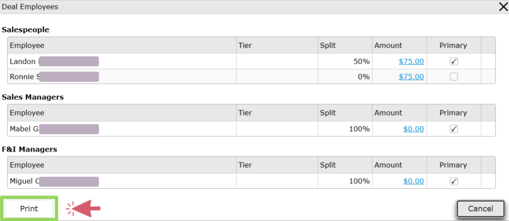
Did this answer your question?Can I print commissions from Post Vehicle Sales?
Yes. Commissions can be printed directly through Post Vehicle Sales. print commissions directly through the Post Vehicle Sales?Just click on the
button in the Action Ribbon and select [Print]!