
Order Sources are essential for managing how your dealership calculates and creates parts stock orders. They influence the speed at which a part is integrated into inventory and determine the quantities that should be ordered.
Part Phasing is implemented to reduce the number of stocked parts that are unlikely to sell, while establishing optimal stocking levels for parts that do sell. Each part follows a defined life cycle.
When you generate a stock order, VUE utilizes each part’s Order Source and Parts Phasing to decide which parts to include and how to calculate the correct quantities. This information is valuable for Parts Managers, Advisors, and Fixed Operations Managers alike
Adding an Order Source
Navigate to: Parts > Maintenance > Order Sources
- Click [New] in the Action Ribbon to open the Add Order Source window.
- Within the Add Order Source window, input the Source name.
- Click [Create].
- Click the Manufacturer dropdown and select, if applicable.
- Input a description in the Description field.
- Click the Part Type dropdown and select.
- Input the Price Code and press Enter, or click the magnifying glass to open the Price Code Search window.
- Within the Price Code Search grid, Filter/Sort and select the Price Code.
- Input the OEM Class Code in the OEM Class Code field.
Adding an Order Source Matrix to a Price Code
Within the Price Code screen:
- Click the Order Sources tab in the Side Menu.
- Click [Add].
- Click the Source dropdown and select.
- Input a percentage amount in the Additional Adjustment field.
- Click [OK].
- Click [Save] in the Action Ribbon.
Within the Order Source screen, click [Delete] in the Action Ribbon to delete an Order Source.
Part Phasing
The lower half of the Order Sources screen determines how fast the Parts with this Source get Phased In and how many to order
Part Phasing is used to minimize the stocking parts that will not sell, and sets appropriate stocking levels for parts that will sell. Each Part is guided through a life cycle
- When first entered into the system, most parts are available but not stocked.
- As demand builds the Part will be Phased In until it becomes a Stocked part.
- The part will eventually Phase Out as demand dwindles until it is no longer a stocked part.
The Right Side of the Screen
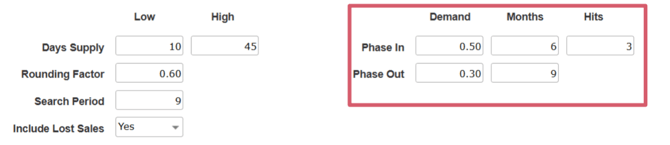
Controls when to Phase-In and when to Phase Out a Part with this Order Source. A HIT is an instance where you invoice a part.
PHASE IN field state that in xx number of Months, I should have at least
x number of HITS with a DEMAND of at least X.XX per Month.
PHASE OUT fields state that when demand falls below these thresholds
the part should be Phasing Out
The Left Side of the Screen
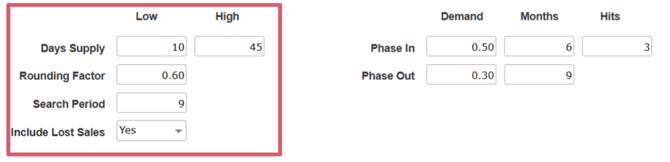
This suggests how many to order
Days Supply - Sets the parameter for the number of days supply to have on the
shelf without reordering. (High and Low )
Rounding Factor – A higher value means more parts will phase in, while a lower
value means less parts phase in.
Search Period - The number of months considered when calculating a stock
order. Include Lost Sales when calculating HITS (Yes or No) .
When generating a part order, the program creates a list of parts for potential phasing based on the criteria from the Part's Order Source.
VUE utilizes the Phase In Months field to count the number of hits. If the hit count exceeds the value specified in the Order Source for Months, the part qualifies for phasing in.
If the hit count is lower than the value in the Order Source, the part does not qualify for phasing. Next, VUE calculates the part's sales by combining the sales figures from the Phase In Months field with the current month's sales.
The total sales are then divided by the number of days in the Phase In Month field, added to the current date.