
The Payroll 401(k) Report provides detailed information on employee and employer contributions to 401(k) and Roth 401(k) plans for a selected date range. This report ensures the accurate tracking of retirement plan deductions and contributions for compliance and financial reconciliation purposes.
When to Use It
Payroll Cycle Review: To verify 401(k) deductions and employer contributions before finalizing payroll.
Benefits Administration: To monitor retirement plan participation and contribution accuracy.
Audit Preparation: To provide detailed 401(k) records for internal or external audits.
Year-End Reporting: To confirm totals for annual compliance and reporting to plan providers.
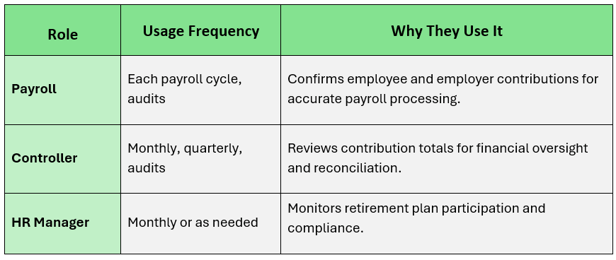
Who Uses the 401(k) Report, How Often, and Why
Navigate to: Accounting > Payroll > Reports >Payroll 401k Report
Choose Parameters
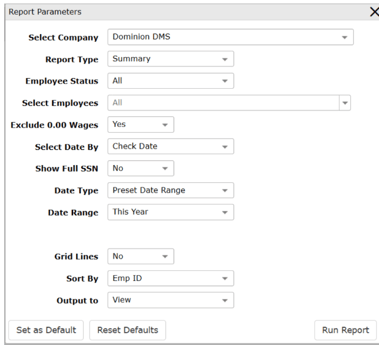
This section clarifies the parameters outlined in this report. For additional details that apply to all reports, please refer to the Common Report Features article.
-
Employee Status Filters employees based on status.
-
-
All: Includes active and inactive employees
-
Active: Includes active employees only
-
Inactive: Includes inactive employees only
-
-
Select Employee determines which employees are included.
-
All: Includes all employees
-
Select: Allows selection of specific employees
-
-
Exclude 0.00 Wages: Determines whether employees with zero wages are excluded.
-
Yes: Excludes employees with zero wages
-
No: Includes employees with zero wages
-
-
Show Full SSN: Determines whether full Social Security Numbers are displayed.
-
Yes: Displays full SSN
-
No: Masks SSN for security
-