
The Parts Sales History Report is a monthly document used by parts managers to track sales performance and manage inventory by listing every part sold, including details such as manufacturer, part number, description, quantity sold, current inventory, and outstanding orders; it aids in identifying sales trends, monitoring slow-moving inventory, and making informed restocking decisions to avoid stockouts and overstock situations.
Recommended Frequency: Monthly
- Tracking Sales Performance
- This helps management and staff monitor which parts are selling well, identify slow-moving inventory, and spot trends in customer demand.
- Inventory Management
- By showing both the quantity on hand and on order for each part, the report supports decisions about restocking, discontinuing items, or adjusting order quantities.
-
- It helps prevent stockouts and overstock situations, ensuring the right parts are available when needed.
Navigate to: Parts > Reports > Sales > Parts Sales History
Choose Parameters
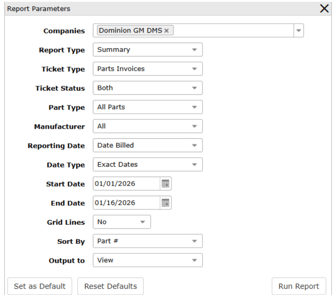
This section clarifies the parameters outlined in this report. For additional details that apply to all reports, please refer to the Common Report Features article.
-
Report Type:
-
-
Summary: List of part numbers, Sold Amount, On Hand, and On Order
-
Detail: Same as Summary and includes Bin, Billed Date, Ticket Type, Ticket #, Cost and Employee #
-
-
Ticket Type: Both, Repair Orders or Invoices
-
Ticket Status: Both, Open or Closed tickets
-
Part Type: All, NPN or Stocked Parts
-
Reporting Date:
-
Date Closed: The date that the ticket was closed
-
Date Billed: The date the part was billed on the ticket
-