
Repair Orders may be partially closed to allow for a customer’s payment to be taken, while still awaiting a warranty payment. All operations with like pay types must be marked completed. The completed operations are the ones that will be closed and payment taken on.
Within the Repair Order screen:
Navigate to: Service > Advisor > Repair Orders
All operations must be marked completed, and Payment taken before a Repair can be closed.
-
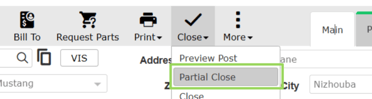
Hover over the Close icon in the Action Ribbon.
-
Select the Partial Close option.
-
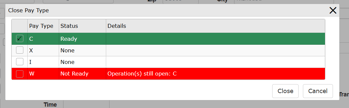
Click the box next to the Pay Type to close
-
Select the [Close] button.
A Pay Type can only be closed when the Status is “Ready” and the line is green.
Once the Warranty Claim has been processed and payment received, the Repair Order can be fully closed by completing the operation and finalizing the RO.Did this answer your question?