
The Journal Detail report provides a line-by-line breakdown of journal entries, including specific transactions, account categories, and financial impact. It’s designed to give users a deeper understanding of how each journal entry affects liabilities, assets, income, and profit/loss.
When to Use It:
- Detailed Financial Review: Ideal for users who need to trace individual transactions and understand their impact on financial statements.
- Audit Support: Useful for auditors or finance staff verifying the accuracy of journal entries.
- Error Investigation: Helps identify and correct misposted entries or discrepancies.
- Training & Learning: Great for new users learning how journal entries flow through the system.
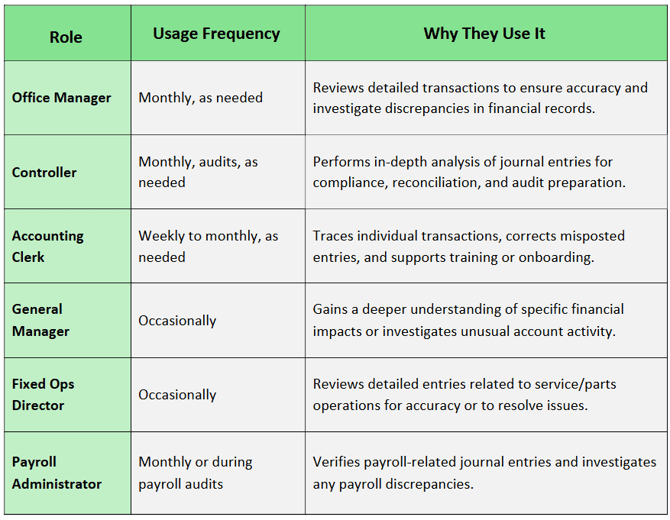
Who Uses the Journal Detail Report, How Often, and Why
Navigate to: Accounting > Reports > Journal > Detail
Choose Parameters
This section clarifies the parameters outlined in this report. For additional details that apply to all reports, please refer to the Common Report Features article.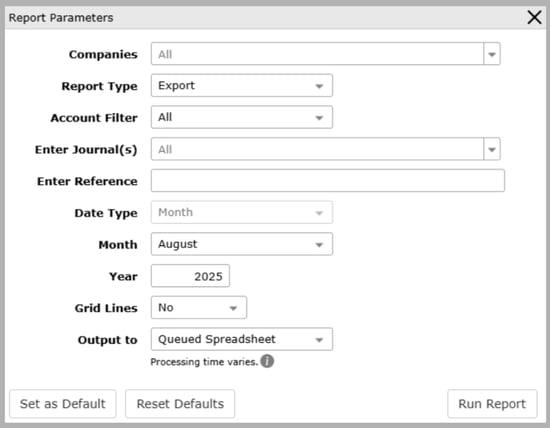
-
Report Type: The style or layout of the report.
-
Detail: Displays summarized journal entry information by reference number, including liabilities, assets, sales, cost of sales (COS), expenses, profit/loss, and date. (See first screenshot example.)
-
Extra Detail: Provides a more granular breakdown, including account numbers, control numbers, batch numbers, post descriptions, and account descriptions for each line item. (See second screenshot example.)
-
Export: Shows a comprehensive list of all journal transactions with columns for company, account type, account description, reference number, control number, posting description, amount, transaction dates, batch number, and employee number. (See latest screenshot example.)
-
-
Account Filter:
-
All: Includes all accounts
-
Range: Specify a range of accounts
-
Select: Choose specific accounts
-
-
Enter Journal(s): Options include All or Select
-
Enter Reference: Optional field for filtering by reference number