
The General Ledger Report provides a comprehensive, line-by-line breakdown of account activity for all or selected accounts within a specified period. Users can generate the report for all accounts, a specific range of accounts, or by selecting individual accounts as needed.
The report displays each account’s beginning balance, current month activity, year-to-date totals, and detailed descriptions for every transaction. This format is designed to provide users with a comprehensive view of financial movements across accounts, enabling in-depth analysis of balances, transaction history, and financial trends.
When to Use It:
- Investigating Account Balances: Ideal for tracing the origin, nature, and changes in any account’s balance over time.
- Comprehensive Financial Review: Used when a full, detailed review of all accounts and their activity is required—such as during month-end or year-end close.
- Error Detection and Correction: Helps identify and resolve discrepancies, mispostings, or unusual activity within any account.
- Executive or Management Reporting: Useful for providing leadership with a complete financial snapshot and supporting strategic decision-making.
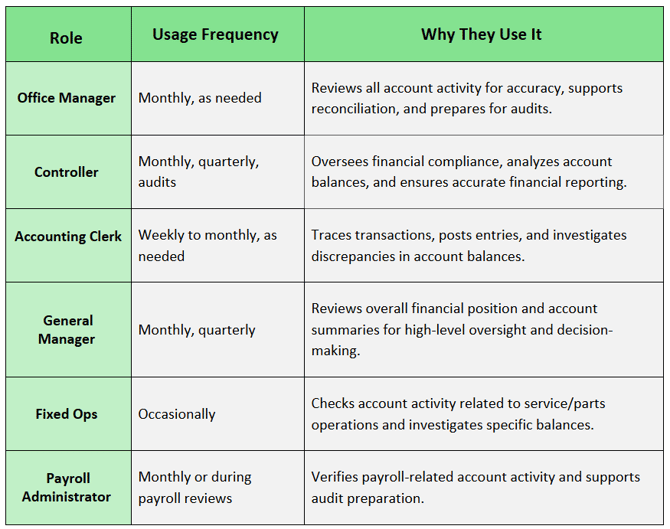
Who Uses the General Ledger Report, How Often, and Why
Navigate to: Accounting > Reports > General Ledger
Choose Parameters
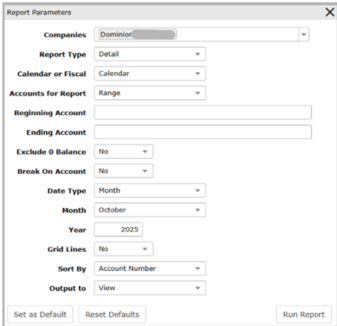
This section clarifies the parameters outlined in this report. For additional details that apply to all reports, please refer to the Common Report Features article.
-
Report Type:
-
Standard: Displays summarized account balances for the selected period.
- Detail: Shows detailed transactions including account number, account name, transaction date, post date, reference numbers, and descriptions.
-
Export: Generates a detailed data file for external analysis (CSV/Excel). Includes all columns for transaction-level data without formatting.
-
-
Calendar or Fiscal: Choose Calendar or Fiscal reporting basis
-
Accounts for Report: All, Range (Specify Beginning and Ending Account), or Select (Choose specific accounts)
-
Beginning Account / Ending Account: Define range if applicable
-
Exclude 0 Balance: Yes or No
- Break on Account: Yes or No (When yes, the report inserts a page or section break whenever the account changes, grouping transactions and showing totals for that account.)
-
Sort Descending: Yes or No
-
The Report Includes:
-
Summary View: Account balances for the selected period and totals by account.
- Detail View: Account number, account name, transaction date, post date, reference numbers, descriptions, current month and year-to-date totals
-
Export View: Full schedule-level data for detailed analysis
-