
Learn to create dashboards before creating this report. See a short video and step-by-step instructions by searching Help for How to Create Dashboards.
Navigate to: Your VUE Dashboard homepage.
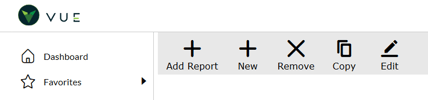
- Create a new Dashboard by clicking the [New] button in the action ribbon
- Enter a name for the report
- Select [Create]
In the Report Tab
- Report Basis - Select Service Repair Orders
- Report Title - “Today's Menu Count"
- Default View - Number
In the Filters Tab
- Set Background Color
- Specify Number 1 as [Units Count]
- Leave Upper Text Blank Lower Text “Service Today”
- Click [ Add Condition ]
- [ Has Menu ] [ = ] [ Yes ]
- Click [ Add Condition ]
- [ Type ] [ =] [ Service ]
- Specify Number 2 as [Units Count]
- Leave Upper Text Blank Lower Text “QL Today”
- [ Type ] [ =] [ Quick Lube ]
- Save
In the Parameters Tab
1. Report Title [ Today’s Menu Count ]
2. Companies [ Select Companies to include ]
3. Advisor [ All or select individual ]
4. Open Status [ All ]
5. Based On [ Open Date ]
6. Date Type [ Preset Date Range ]
7. Date Range [ Today ]
Did this answer your question?