The Closed RO Report allows Service Advisors and Managers to generate detailed reports on closed repair orders, analyzing customer types, labor hours, and cost breakdowns. Use this report to make informed management decisions and improve overall service operations.
Recommended Frequency: Daily and Weekly
Key Uses:
- Performance Tracking: The Closed RO Report provides a breakdown of closed ROs by department and pay type (Customer Pay, Internal, Warranty, etc.), showing counts, labor hours, sales, fees, and totals.
- Financial Analysis: The report summarizes revenue and costs associated with each pay type and account code, helping managers understand profitability and expense distribution.
- Operational Oversight: By listing subtotals for each category, it helps service managers and department heads monitor workflow, productivity, and financial outcomes for closed jobs.
Navigate to: Service > Reports > Sales > Closed RO Report
-
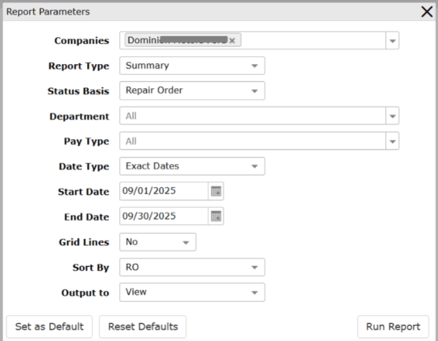
Report Type: Summary, List, Part Detail, Void RO’s, Detail, Export
-
Status Basis: Repair Order, Job, Posted
-
Department: Service, Body Shop, Quick Lube
-
Pay Type: Customer Pay, Internal Pay, Warranty, Extended Service
-
Date Type: Exact Dates, Preset Date Range, Dynamic Date Range, Month, Quarter, Year
-
Start Date: Manual input or Calendar
-
End Date: Manual input or Calendar
-
Grid Lines: Yes/No - line to separate each row of data
-
Sort By: Account Type, Advisor, Customer Name, OP Code, Pay Type, RO
-
Output: view, PDF, spreadsheet
The parameters can be saved as a default by selecting [Set as Default], or you can [Reset Defaults] before selecting [Run Report].
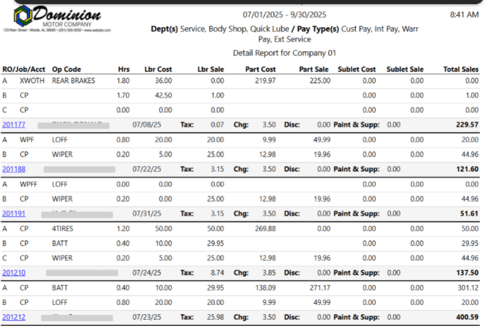
Here is an example of a Report Type: Detail with Grid Lines set to Yes.
Each operation is displayed in full detail. Select the hyperlink on any row to open the associated Repair Order directly.
Selecting the Report Type: Detail displays additional Closed Repair Order information, including costs associated with Paint and Supplies.