
The Arrived Inventory report provides a listing of active vehicles stocked into inventory during the selected time period.
Frequency: Weekly or Monthly
Who uses it: Inventory Clerk and Dealership Managers
Why they use it: Track and review stocked vehicles
Navigate to: Sales > Reports > Vehicle > Arrived Inventory
Choose Parameters
This section clarifies the parameters outlined in this report. For additional details that apply to all reports, please refer to the Common Report Features article.
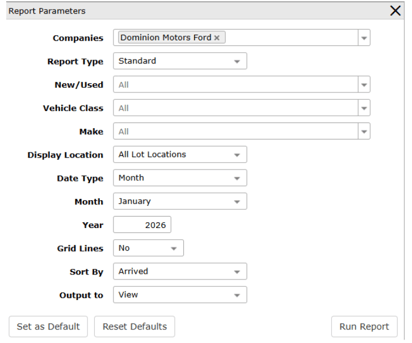
Report Type – Standard to generate in VUE, Export to generate an Excel spreadsheet.
New/Used - Select specifically to generate report information on New or Used vehicles. All is the default.
Vehicle Class – Select specifically to generate report information on types of vehicles (Car, SUV, Truck, etc.). Multiples can be selected. All is the default.
Make - Select specifically to generate report information on Makes of vehicles (Chevrolet, GMC, Buick etc.). Multiples can be selected. All is the default.
Display Location – If applicable, and vehicle records include Lot information. Default is All Lot Locations. Selecting Include generates a Lot Location(s) facet to type specific lot(s) for the report to only look at (separate multiple Lot codes with a comma). Selecting Exclude generates a Lot Location(s) facet to specify the lot(s) to omit from the report (separate multiple Lot codes with a comma).